

Role & Summary
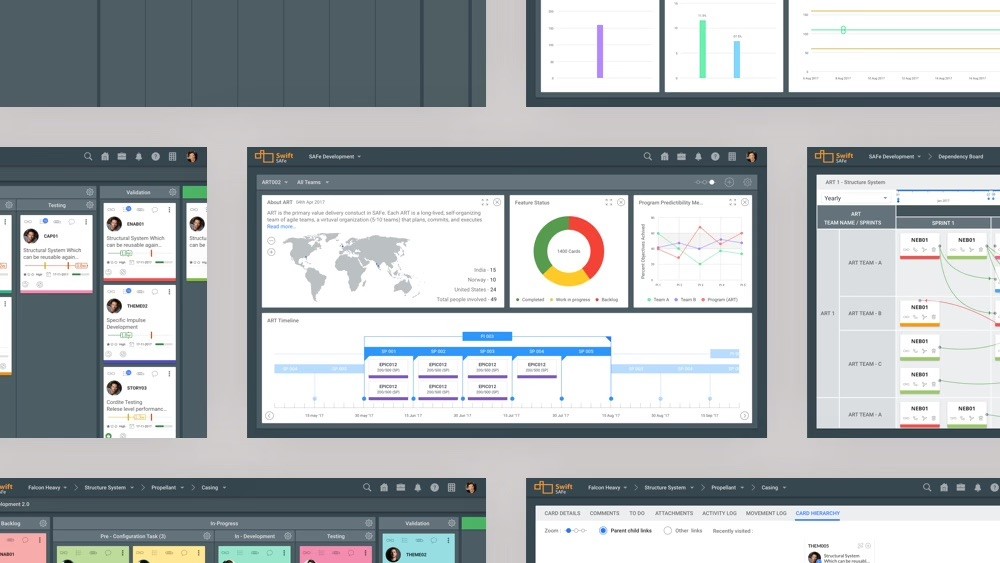
Nimblework sold agile tooling to large organisations running SAFe — a framework that coordinates work at portfolio, program and team levels simultaneously. Customers described the product as one of the most capable on the market and, in the same breath, as hard to use. I was the sole designer across the suite. That meant one person owned executive roadmap planning, the team-level Kanban board, and the mobile app, and could treat them as one system rather than three products. The work centred on a single trade-off: the product's power was the reason customers bought it, so simplification could not mean removing capability. It had to mean reducing the number of decisions a user faced at any one moment.

Business Context
Agile works well at team level. Large organisations adopting it across hundreds of people hit a different problem — how to hold a centralised strategy while execution stays decentralised.
SAFe answers that by operating at three levels at once. Portfolio, where strategic themes are funded and prioritised. Program, where release trains of eight to twelve teams coordinate. Team, where sprints actually run.
Nimblework's products served all three. That is why enterprises bought them, and it is also why the products were difficult. A tool serving an executive setting portfolio priorities and a developer moving a card on a board is serving two people with almost nothing in common — different vocabularies, different time horizons, different definitions of "done."

Strategic Decision
Reduce decisions, not capability.
The available move was to simplify by removing: fewer features, cleaner screens, better demos. For a consumer product that often works.
Here it would have destroyed the reason customers chose the product. Enterprises bought it precisely because it handled portfolio-level complexity that lighter tools could not. Every feature that looked like clutter to a new user was the reason some existing customer had signed.
I framed the goal differently: keep every capability, reduce the number of decisions visible at any one moment. Move complexity from the screen into the sequence.
The cost is real and worth naming. Staged interfaces are harder to build, and harder to sell, because an enterprise demo traditionally works by showing everything the product can do on one screen. Designing for the new user's first hour makes the sales engineer's job less impressive.

Design Principles
Match the level to the user. A portfolio manager and a developer need different densities of the same data.
Sequence complexity; don't delete it. Capability stays; exposure is staged.
Optimise the repeated action. In planning tools, the action performed a hundred times matters more than the one performed once.
Key Product Decisions
Flatten the hierarchy for the one job that repeats — the Groomed Backlog
Planning a roadmap means assigning work items to releases and sprints. The product's structure was strictly hierarchical: items live inside themes, inside epics, inside sprints.
That hierarchy is correct for understanding the work and wrong for assigning it. A product manager planning a quarter had to navigate into each epic and theme separately, repeatedly, for a task that is fundamentally comparative — you are choosing what goes in next, which means seeing candidates beside each other rather than seeing their parentage.
I proposed the Groomed Backlog: a flat list collapsing selected items from every sprint, epic and theme into one view, from which the manager drags items directly onto releases and sprints. The Planning Board was structured around it — backlog, planning, releases and sprints — so the act of planning happened in one place instead of across a tree.
The trade-off was losing hierarchy context inside that view. I accepted it because the assignment task does not need parentage; it needs comparison. Priority calls also change mid-planning — something gets parked, something else is pulled forward — and a flat list makes that reversible in a way tree navigation does not.
Design for the naive-to-expert transition on the Kanban board
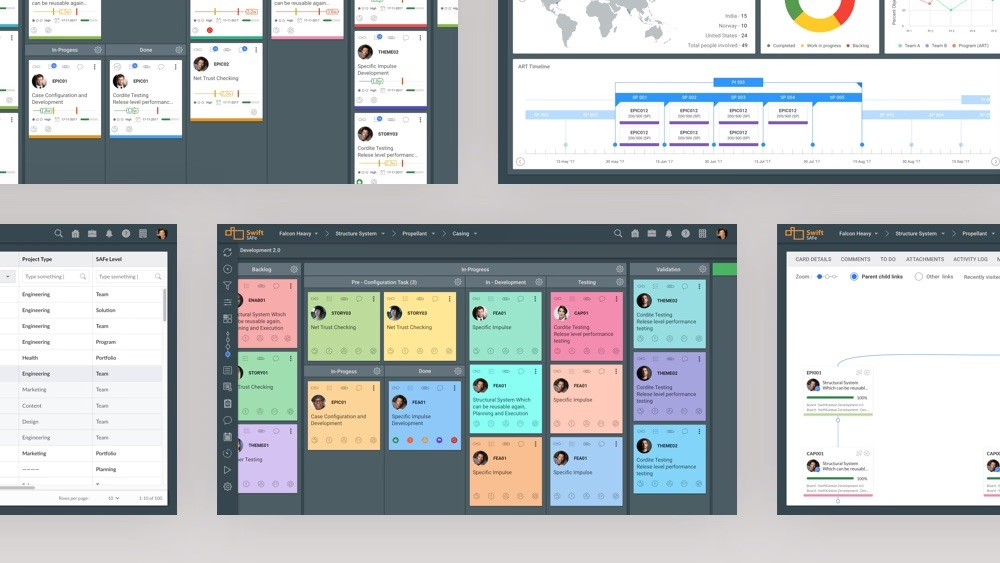
The team-level board carried the clutter complaint most directly. Customers called it one of the most powerful tools on the market and said it lacked a clean interface, with things surfacing from everywhere and no signal about which features a new user should ignore.
I scoped the redesign to run from the product page through sign-up, onboarding and into the board itself, because the transition problem starts before the board does — a user's model of the product is set by what they meet first.
Rather than invent a visual language, I explored the redesign against two established ones, so effort went into structure instead of aesthetics. I worked on the Fluent direction while a colleague worked on Material, which let us compare two complete positions rather than argue about details of one.
Decide what mobile is for, rather than shrinking the desktop
The mobile app moved from a hybrid build to native, and I used the rebuild to reset what mobile was for rather than porting the desktop feature set.
The structure follows what people actually do away from a desk: check status, respond, unblock. The board dashboard became tiles showing activity per project — new cards, blocked cards, movement — so the landing screen answers "what changed" rather than "here is everything." An inbox logged day-to-day activity across swimlanes, giving each person a single view of what was theirs.
Kanban boards do not fit a phone screen honestly. Rather than compress columns until they were unreadable, I gave each screen one column, with a swipe revealing the next and moving through swimlanes — accepting slower navigation in exchange for cards that could actually be read.
The Cumulative Flow Diagram survived the cut, along with other analytical widgets. It is the heaviest thing in the app and it stayed because the person most likely to open an agile tool on a phone is the one checking whether work is flowing, not the one moving a card.
Outcomes
Product. The Groomed Backlog shipped as the centre of the Planning Board, replacing per-epic navigation with a single flat, drag-driven planning surface. The mobile app shipped as a native rebuild with a new structure — activity dashboard, inbox, mobile-native board navigation — and a dedicated mobile style guide handed to engineering. The web Kanban redesign progressed through two complete design-language directions and was still in flight when I left; the honest status is significant progress from the starting point rather than a completed migration.
Customer. The specific complaint driving the work — powerful but cluttered, no path from novice to expert — was named by customers themselves and became the frame the redesign was scoped against, rather than an internal assumption about what needed cleaning up.
Engineering. Moving mobile from hybrid to native, with a style guide rather than ad-hoc handoff, gave the mobile product its own foundation instead of a compromised version of the web one.
Reflection
Being the only designer across three levels of one product family changed how I work. When nobody else can catch an inconsistency between the portfolio view and the team board, you stop designing screens and start maintaining a system in your head.
It also taught me that "too complex" is usually a misdiagnosis. Customers rarely want less capability from an enterprise tool. They want less of it at once.
What I would do differently: I would treat the naive-to-expert transition as the product requirement rather than a redesign theme. We diagnosed it precisely and then addressed it through visual and structural redesign, when the real answer was probably a staged product — different defaults, different exposed surface area, earned rather than granted. That is a roadmap commitment, not a design project, and I did not push for it as one.
